How It Works
The idea. Describe the machine a project needs in one short file. preconfig writes the setup file each agent platform reads, checks the files a repository already has, and proves the setup on a clean machine. The agent doesn’t need to know any of this.
An AI coding agent in the cloud starts every task on a fresh machine. Something has to install the runtime, the packages and the services before the agent can build or test anything, and each platform reads that something from its own file, in its own format. GitHub Copilot’s cloud agent runs a workflow named copilot-setup-steps. Cursor’s cloud agents build a Dockerfile named in .cursor/environment.json. Codespaces and editors read .devcontainer/devcontainer.json. A fresh server reads cloud-init. Other agents take a script in their settings.
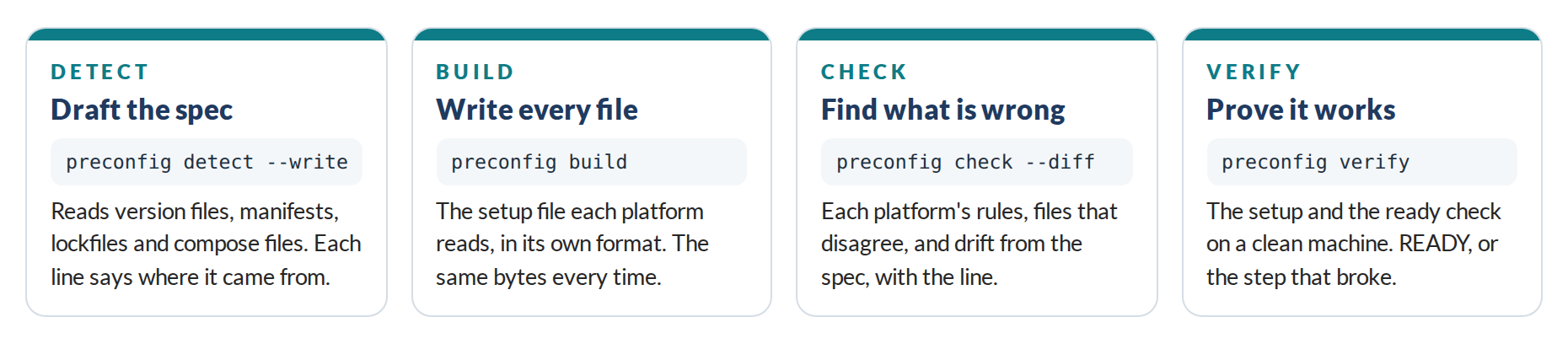
preconfig treats those files as build output. You write the spec, and four commands do the rest:
| Command | What it does | Example |
|---|---|---|
| detect | Drafts preconfig.yaml from version files, manifests, lockfiles, compose files and example environment files, and says where each line came from |
preconfig detect --write |
| build | Writes every target’s files from the spec, the same bytes every time | preconfig build |
| check | Reads the setup files against each platform’s format, against each other and against the spec | preconfig check --diff |
| verify | Runs the setup and the ready check on a clean machine, and names the step that broke | preconfig verify |
detect, build, check and verify take --json for tools, and the exit codes say what happened: 0 for fine, 1 for problems found or a failed ready check, 2 for a failed setup step, 3 when verify can’t start a machine, 4 for errors in the spec.
The Spec
The spec says what the machine needs, not how each platform should install it. A small Node.js shop with PostgreSQL:
version: 1
name: web-shop

runtimes:
  node: "22"

tools:
  - pnpm@10

services:
  postgres:
    version: "17"
    user: shop
    password: shop
    database: shop

env:
  DATABASE_URL: postgres://shop:shop@localhost:5432/shop

secrets:
  - SESSION_SECRET
  - STRIPE_API_KEY

setup:
  - pnpm install --frozen-lockfile

ready:
  - pnpm test
The last line matters most. The ready check is a command that passes only on a machine that works, usually the tests. Without it, verify has nothing to prove.
The spec is strict. An unknown key is an error with the key that was probably meant, a Node.js release the Alpha doesn’t install is refused, and a variable whose name looks like a secret can’t carry a value: secrets are listed by name, and each platform gets them from where it keeps secrets, or from the environment.
One Spec, Five Files
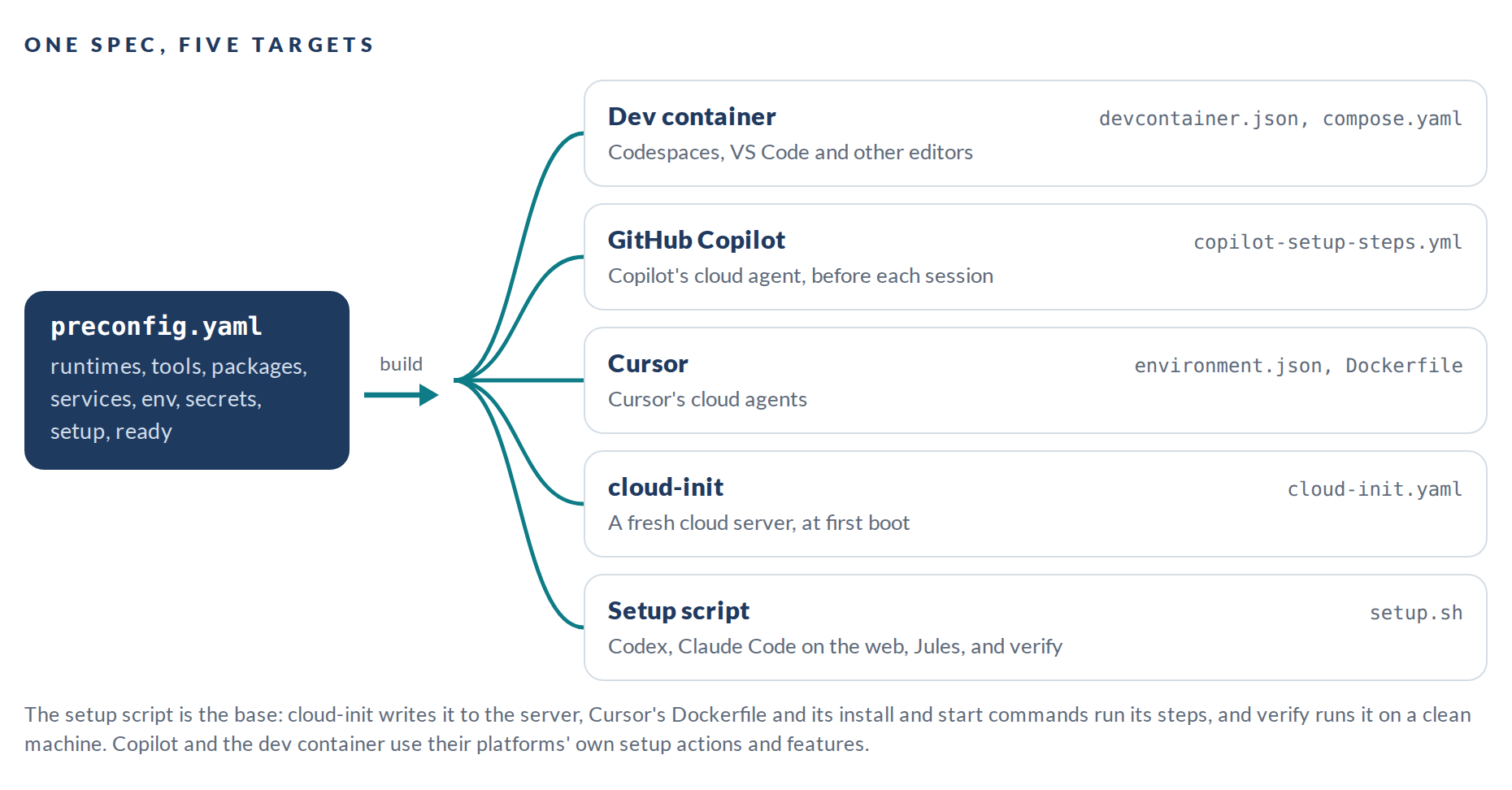
Each target is written the way its platform expects. Copilot and the dev container install through their platforms’ own actions and features; cloud-init and Cursor run the setup script:
- Copilot gets a job named exactly
copilot-setup-steps, on Ubuntu 24.04, using GitHub’s own setup actions at their latest versions, with caches, PostgreSQL and Redis as service containers, and the setup commands. The workflow also runs on its own when it or the spec changes, and then it ends with the ready check, so a pull request proves the setup before Copilot relies on it. - Cursor gets a Dockerfile that runs the setup script’s machine step, and an
environment.jsonwhose install and start commands run the project and service steps. Paths are written relative to the.cursorfolder, as Cursor resolves them. - The dev container gets the Ubuntu 24.04 base image, the runtimes as dev container features, and the services beside it in a compose file, answering on its localhost.
- cloud-init writes the setup script to a new server and runs it once at first boot.
- The setup script installs everything with Ubuntu’s own packages where they fit, and from the usual outside source where they don’t: NodeSource for Node.js, the PostgreSQL project’s archive for other PostgreSQL versions, Redis’s own packages for Redis 8, uv for other Python versions and Go’s toolchain downloads for Go. It’s written to work as root or with sudo, in containers without an init system and on full machines with systemd. So far it has run as root in containers; sudo and systemd are Beta work.
Build twice and you get the same bytes. Every file except Cursor’s environment.json starts with a line saying where it came from, and build prints a note for anything a file can’t carry, such as where each secret has to be set.
What Check Looks For
Most setup mistakes don’t show up when the files are written. A Copilot workflow with the wrong job name stops the next agent session with an error. A job-level env is ignored. A key Cursor doesn’t know fails its schema. A dev container without the databases starts, and the tests can’t pass in it. The first sign is usually a session that goes nowhere. check reads for three kinds of problem:
- Each platform’s rules. The job name, the six job settings Copilot honors, its limit of 59 minutes, its runners; the keys and paths Cursor accepts, and its ban on trailing commas; what a dev container needs to start; cloud-init’s first line.
- Files that disagree. Without a spec, check reads the versions each file installs and warns when they differ.
- Drift from the spec. With a spec, check builds every target in memory, compares each with the file in the repository, and with
--diffprints the difference.
Every finding has a code, the file, the line and a hint:
.github/workflows/copilot-setup-steps.yml:4:3: error C002: no job is named copilot-setup-steps (found: setup), so Copilot stops with an error instead of starting work
    Rename the job "setup" to copilot-setup-steps.
How Verify Proves a Setup
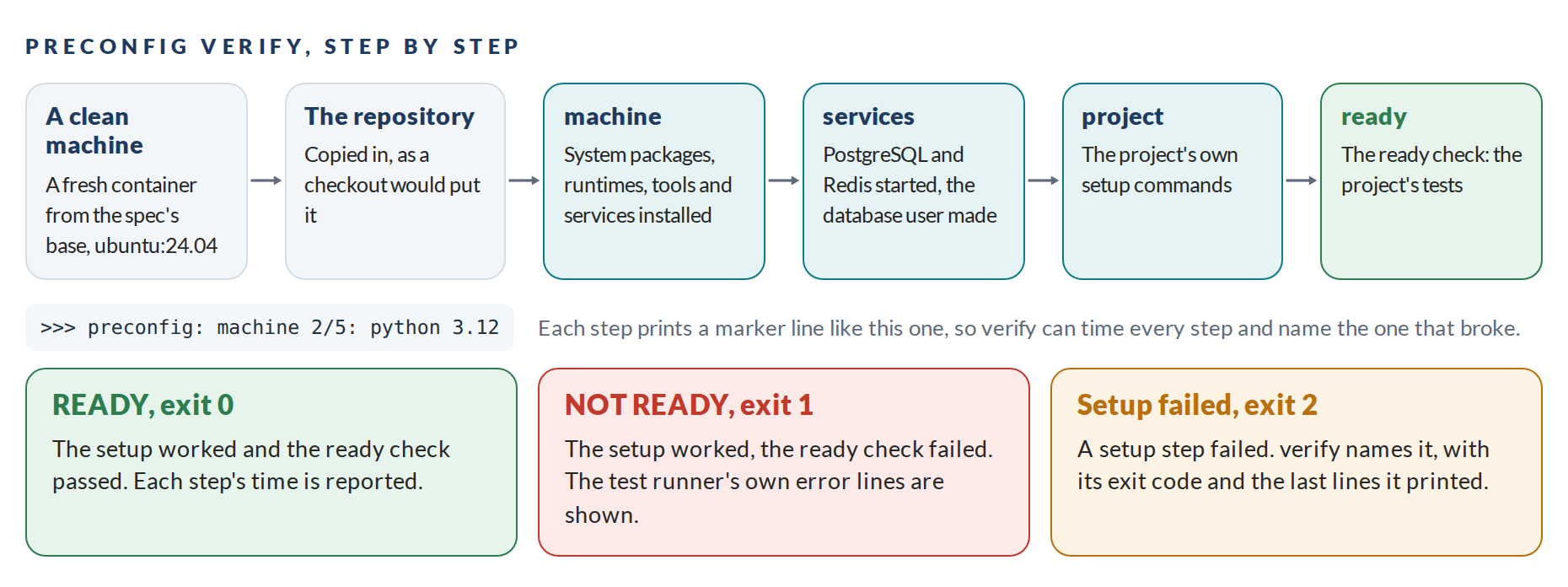
verify starts a container from the spec’s base image, copies the repository in, and runs the generated setup script followed by the ready check. The script prints a marker line at each step, so verify can time every step and name the one that broke:
verify   45.5s  step   ready 1/1: .venv/bin/pytest -q
verify   46.0s  ok     ready 1/1: .venv/bin/pytest -q  (0.5 s)
verify   49.6s  READY  4 passed in 0.25s; 10 steps
The same events come out as JSON Lines with --json, for CI and for tools. Secrets named in the spec are passed into the machine when the environment running verify has them, and never printed. On networks that inspect TLS, --ca-file makes the machine trust the proxy’s certificate.
Keeping Up With the Platforms
The platforms change their formats. Cursor calls the command that installs a project install, where some older setups say update; GitHub’s setup actions move to new major versions every year or so. preconfig keeps the facts that change most in one place, its knowledge base, with the date it was last checked against each platform: September 29, 2026 for the Alpha. When a platform changes, that one place changes, and every repository picks it up on its next build.
The Hard Part
The files are the easy part. Making them work on five platforms, and knowing they do, takes care:
- Silent failures. Most platforms skip or ignore what they don’t understand. check encodes each platform’s rules, so the mistake shows up at the desk, not in an agent session.
- Machines without an init system. Containers usually have no systemd, so the script starts PostgreSQL and Redis directly there and with systemd on full machines, and waits until each one answers.
- Versions the base doesn’t ship. Ubuntu 24.04 ships Python 3.12, PostgreSQL 16 and Redis 7. Anything else comes from the usual outside source for it, and the script checks that the version it installed is the one asked for.
- Quoting. A value like
3.10or2026-09-30becomes a number or a date in some YAML readers. preconfig’s quoting was tested with 64,686 strings in five YAML readers, and every one read back as the same string. - Proof that means something. verify can only prove what the ready check tests. A spec without a ready check is allowed, with a warning that nothing will be proven.
What It Does Not Do
preconfig is not a sandbox and doesn’t limit what an agent does while it works. It doesn’t write the agent’s instructions: AGENTS.md and rules files sit beside it. It isn’t a package manager: it uses each platform’s usual way of installing things and leaves no program of its own on the machine. And it doesn’t run anything while the agent works. What it leaves behind is plain files the platforms already read.